So far we covered the fundamental concepts of ml, setup on ubuntu and initial model creation in python using scikit-learn library. Most of the text so far is about basics of ML. And next steps-
1. Dive into the actual application idea 2. Understand the available dataset 3. Start to cover the code.
Network infrastructure has been the backbone of the internet and, therefore, the target of malicious actors interested in gaining unauthorized access, rendering it in a state of failure, as well as covertly accessing the data. Using machine learning algorithms to detect such attacks is an active area of research and is being implemented in intrusion detection systems (IDS), anomaly detection, and traffic classification.
Detection models can accurately identify 99.3% of intrusions while maintaining a low false alarm rate of 0.5%
Frontiers | Unveiling machine learning strategies and considerations in intrusion detection systems: a comprehensive survey
Imagine if the system software can observe the network traffic on a network interface like a NIC/Router/bridge device, and detect any attack like DoS in real-time and take preventative action(commercially available options). I am going to try and build an ML system which does the same for this project.
Looking at the implementation of such a system, the training dataset plays the primary role in defining the contours of the solution, and then it is further ordered to address the technical challenges associated with it and comply with the regulatory laws(privacy concerns/laws).
Data Collection
The application of AI in tools for defence against attacks on networking becomes even more interesting, given the dynamic nature of attacks and the varied network infrastructure. However, there was a lack of a reliable, sizable dataset to use for the training. Worry not- The Army Cyber Institute (ACI) released an Internet of Things (IoT) Network Traffic Dataset 2023 (ACI-IoT-2023), which is a novel dataset tailored for machine learning (ML) applications in the realm of IoT network security.
Internet of Things (IoT) Network Traffic Dataset 2023 (ACI-IoT-2023)
Dataset: Nathaniel Bastian, David Bierbrauer, Morgan McKenzie, Emily Nack, December 29, 2023, ” ACI IoT Network Traffic Dataset 2023″, IEEE Dataport, doi: https://dx.doi.org/10.21227/qacj-3×32.
This is the dataset I am going to be using for training the model, and it can easily be downloaded from Kaggle as well.
Looking at files in the dataset, we can see that it includes raw packets in PCAP format as well as CSV files, which have data extracted from these PCAPs and stored in a labelled format in the CSV.
One can choose to use this CSV, or preprocess the PCAP files to extract and form their parameter dataset in CSV. For this exercise, I am going to use the CSV as is 🙂
It includes the network parameters mostly looked at, like IP addresses, ports, protocols, as well as other metadata, including flow duration, total number of bytes in forward and backwards directions.
Execution
Now that we have the basic concept, and our idea as well as the dataset required for the idea, how do we approach lower-level implementation?
The terms like ML workflow/pipeline were unclear to me and had a repelling effect when trying to implement the idea. So we skip those terms for now and see what **steps** are involved and their **necessary order** of execution to get the results we desire, i.e. a trained model from a dataset, which is what those ML workflows or pipelines do.
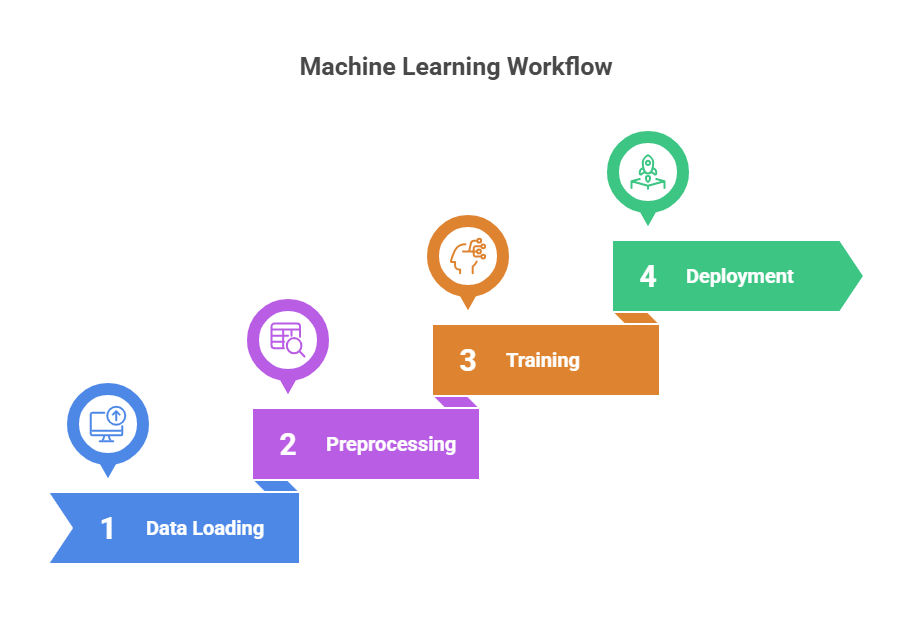
The above figure shows the general steps involved from start to finish, and when the same approach is applied to this idea, we can step into each and see what new terms we learn.
The first and foremost part, which is extremely important yet optional and gets overlooked while embarking on any new project –logging– cannot emphasise enough how crucial it is to ensure a successful outcome.
- Data Loading: This is the step where we load the CSV file programatically and process the data from the file in batches, as it is a huge file and the script is going to be a user process, loading a large file into memory at once may cause an out-of-memory exception for the process. The data in batches is loaded into a pd dataframe, which is essentially a 2D tabular data structure format representation (row x col)- and allows for easy data manipulation and access, as well as performing complex statistical operations on the data programmatically.
- Data Preprocessing: The idea behind preprocessing is that the raw data could be transformed into a form which shows relative information in terms of ratios and rates which would help identify the assymetric patterns or normalize the differences in parameters.
- This is also called as feature enhancement which is method to create derived features from existing data. Think of it as , for example by observing the traffic we can get the forward packet bytes and backward packet bytes, And using it we can derive
byte ratio = fwd packet bytes/bwd packet bytes - Which is a ratio between forward and backward packet bytes. it indicates data transfer patterns & Instead of just knowing “100 forward packets,” we know “10:1 forward-to-backward ratio” This provides context about the nature of network communication.
- DDoS attacks often show high forward/backward packet ratios Data exfiltration might show unusual byte ratios & Scanning attacks typically have distinctive packet patterns
- using data preprocessing we can attune the system to rely on relevant parameters or metadata and maintain granular control over the training parameters.
- This is also called as feature enhancement which is method to create derived features from existing data. Think of it as , for example by observing the traffic we can get the forward packet bytes and backward packet bytes, And using it we can derive
- Data Splitting: To evaluate a model’s performance, we split the dataset into two subsets:
- Training set – Used to train the model so it can learn patterns in the data.
- Test set – Kept separate from training data and used only after training to evaluate performance.
- Once the model is trained on the training set, it is fed the test data. The model’s predictions on this test set are compared against the actual (ground truth) labels in the dataset. Based on this comparison, evaluation metrics such as accuracy, precision, recall, or F1-score are calculated to determine how well the model performs.
This is exactly what the code below does and in that specific order, it is the main function code in python.
def main():
    try:
        logging.basicConfig(       # Configure logging for monitoring
            level=logging.INFO,
            format='%(asctime)s - %(levelname)s - %(message)s'
        )

        with Timer("Total execution"):
            logging.info("Starting data processing pipeline")

            chunk_size = 10000
            chunks = []
            total_rows = sum(1 for _ in open("../ACI-IoT-2023.csv")) - 1
            total_chunks = (total_rows // chunk_size) + 1

            with tqdm(total=total_chunks, desc="Loading data chunks") as pbar:
                for chunk in pd.read_csv("../ACI-IoT-2023.csv", chunksize=chunk_size):
                    chunks.append(chunk)
                    pbar.update(1)

            df = pd.concat(chunks, ignore_index=True)

            preprocessor = DataPreprocessor(batch_size=10000)
            trainer = ModelTrainer()

            logging.info("Starting feature enhancement")
            df = preprocessor.enhance_features(df)
            logging.info("Starting data preprocessing")
            X, y = preprocessor.preprocess_data(df)

            logging.info("Splitting data into train/test sets")
            X_train, X_test, y_train, y_test = train_test_split(
                X, y, test_size=0.2, random_state=42, stratify=y
            )

            logging.info("Starting model training")
            results = trainer.train_and_evaluate(X_train, X_test, y_train, y_test)

            logging.info("\nTraining Results:")
            for model_name, metrics in results.items():
                logging.info(f"\n{model_name.upper()} Results:")
                for metric_name, value in metrics.items():
                    logging.info(f"{metric_name}: {value:.4f}")

            logging.info("\nTraining completed successfully!")
            display_results(results)

            deployment = ModelDeployment()
            save_dir = deployment.save_models(
                models=trainer.models,
                preprocessor=preprocessor,
                results=trainer.results
            )
            print(f"Models saved to: {save_dir}")

    except Exception as e:
        logging.error(f"Error in main execution: {str(e)}")
        logging.error("Training failed!")
        return

if __name__ == "__main__":
    main()
the data preprocessing in covered here in detail
we will discuss the subsequent model training and deployment in next episode 🙂
Leave a Reply